
Welcome to the battle of Domains.
Ryōiki Tenkai DNS Exploitation.
DNS
DNS serves as the backbone of internet navigation, translating human-readable domain names (e.g., www.example.com) into IP addresses (e.g., 192.0.2.1). Its architecture comprises several critical components:
- DNS Resolvers: These are client-side components that query DNS servers for the corresponding IP addresses of domain names. When a user enters a URL, the resolver initiates the query process.
- DNS Servers: These include:
- Authoritative DNS Servers: They hold DNS records for specific domains and provide authorities response to queries.
- Caching DNS Servers: These servers temporarily store responses to queries to speed up future requests and reduce load on authoritative servers.
- Zone Files: These text files contain mappings of domain names to IP addresses and define the structure of a domain’s DNS hierarchy. Zone files include various record types, such as A (address), AAAA (IPv6 address), MX (mail exchange), and CNAME (canonical name) records.
Enumeration
Nmap -sC (default scripts) and -sV (version scan)
(collecting info about the other’s domain)
DIG - NS Query
dig ns inlanefreight.htb @10.129.14.128DIG - Version Query
dig CH TXT version.bind 10.129.120.85DIG - ANY Query
dig any inlanefreight.htb @10.129.14.128Attacks
(Let the Domain battle begain!)
- DNS Zone Transfer is a DNS operation that copies the entire contents of a DNS zone (all records for a domain) from a primary/master DNS server to a secondary/slave server. It’s used for legitimate DNS replication, but if misconfigured it can leak your full DNS namespace to anyone who requests it.
Use the dig utility with DNS query type AXFR option to dump the entire DNS namespaces.
DIG - AXFR Zone Transfer
dig AXFR @ns1.inlanefreight.htb inlanefreight.htb- Domain Takeovers & Subdomain Enumeration
- DNS has a record (often a
CNAME) pointingsub.example.com→somehost.provider.com. - The resource at
somehost.provider.comis deleted/deprovisioned (or never provisioned), but the CNAME stays in DNS — a dangling DNS record. - An attacker registers the corresponding resource at the provider (or claims a service slot) and serves content, now answering for
sub.example.com. - Common providers/services involved historically: GitHub Pages, AWS S3, Azure, Heroku, Zendesk, Unbounce, etc. (cloud/hosted services that allow custom hostnames). Subdomain Enumeration
./subfinder -d inlanefreight.com -vdig +noall +answer sub.example.com
The tool has found four subdomains associated with inlanefreight.com . Using the nslookup or host command, we can enumerate the CNAME records for those subdomains.
EX—
host support.inlanefreight.com
support.inlanefreight.com is an alias for inlanefreight.s3.amazonaws.com
The support subdomain has an alias record pointing to an AWS S3 bucket. However, the URL https://support.inlanefreight.com shows a NoSuchBucket error indicating that the subdomain is potentially vulnerable to a subdomain takeover.
- DNS Spoofing Injecting fake DNS responses (local cache poisoning, man-in-the-middle) to redirect victims to attacker-controlled IPs.
Local DNS Cache Poisoning
From a local network perspective, an attacker can also perform DNS Cache Poisoning using MITM tools like Ettercap or Bettercap.
To perform this attack, I have to edit the
/etc/ettercap/etter.dnsand enter the name of the site i want to spoof(e.g., lol.com) and the ip i want to user to redirect (e.g., 192.168.225.110)
cat /etc/ettercap/etter.dns
lol.com A 192.168.225.110
*.lol.com A 192.168.225.110
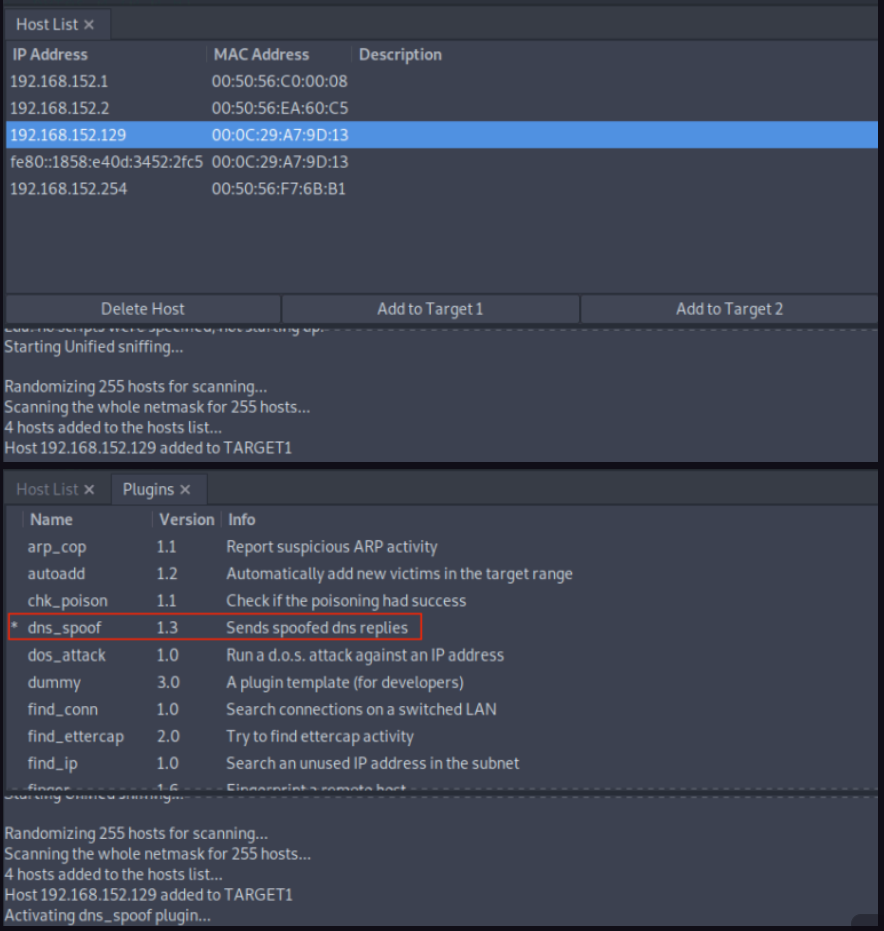
now start the ettercap once it’s done add the target IP address (e.g.,192.168.152.129 ) to Target1 and add a default gateway IP (e.g., 192.168.152.2 ) to Target2.
Activate dns_spoof attack by navigating to Plugins > Manage Plugins . This sends the target machine with fake DNS responses that will resolve lol.com to IP address 192.168.225.110 :
-
DNSSEC — protects integrity/authenticity, not availability or takeover.
-
TSIG keys — to secure zone transfers (prevent unauthorized AXFR).
-
DNS cache poisoning (Kaminsky attack) — why random TXID/ports matter.
-
DNS tunneling — attackers use DNS for exfiltration (detect via unusual queries).
-
DNS amplification (DDoS) — open resolvers abused for reflection attacks.
-
Defender view — logging, monitoring, mitigation (zone transfer restrictions, stale record cleanup, DNSSEC, split-horizon DNS).
What’s the impact?
(what’s the impact of this battle) This class of DNS vulnerabilities poses a critical risk to both users and the business: attackers can harvest a full inventory of hosts via misconfigured zone transfers, claim dangling subdomains to host phishing or malware, or silently redirect users through cache poisoning and spoofing. With those capabilities an attacker can steal credentials and session tokens, intercept or alter traffic (enabling MITM and data exfiltration), hijack integrations or webhooks, and even amplify DDoS attacks — all without needing direct access to the target systems. The result is account takeover, financial loss, loss of sensitive data, service outages, regulatory exposure, and severe reputational damage that erodes user trust and partner confidence.
Mitigation
(how to protect our selft from other’s doamin!)
-
Restrict zone transfers to authorized secondary servers and enforce TSIG authentication.
-
Regularly identify and remove stale or dangling DNS records.
-
Perform automated subdomain enumeration and takeover checks to catch misconfigurations early.
-
Implement DNSSEC where feasible to ensure response integrity.
-
Enforce TLS/HSTS on all web properties.
-
Disable or rate-limit open DNS resolvers to prevent abuse.
-
Monitor DNS logs, certificate transparency (CT) logs, and traffic patterns for anomalies.
-
Combine these practices to reduce risk of credential theft, traffic hijacking, service disruption, and reputational damage.
Follow me on X for updates and more write-ups :Sh1dO0w